


Magical Forest Color by Number
4.779.00 Reviews
App Specs
- Version
- 1.0.9
- Updated On
- License
- Free
- Downloads
- 50,000+
- Developer
- Joyarc Coloring Games
- Categories
- Board
- Platform
- Android
Screenshots
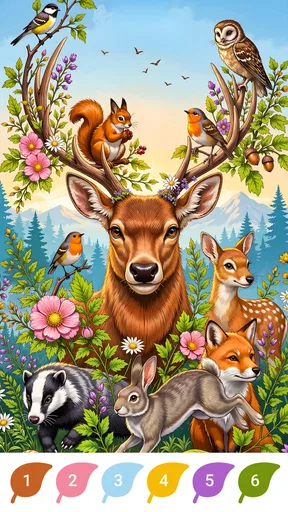
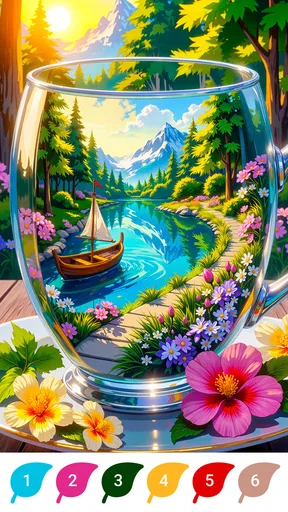
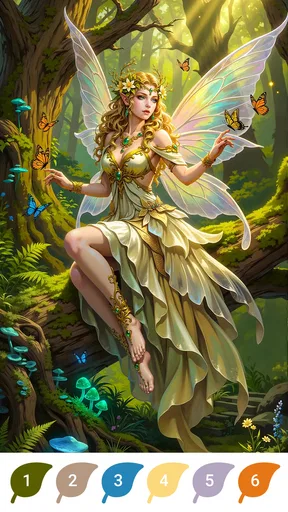


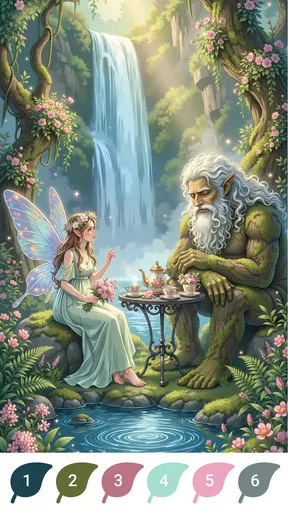
 Analysis by AppCompare
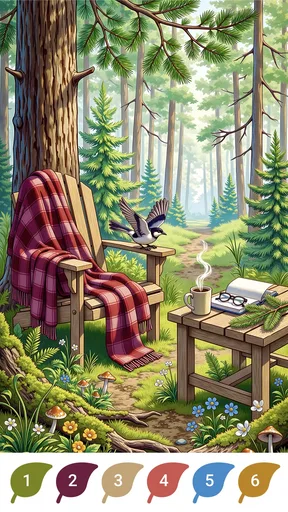
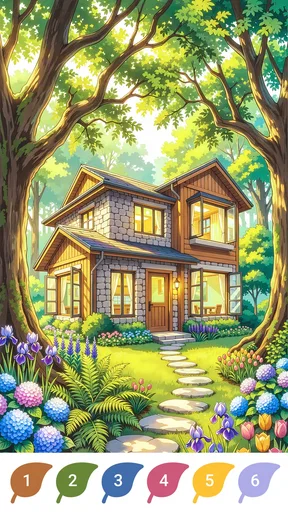
I tried Magical Forest Color by Number as a quiet board-style game rather than a traditional competitive pastime, and that distinction matters from the first minute. Its appeal is the act of completing illustrated forest scenes one numbered area at a time, not beating another player or solving a difficult puzzle under pressure. The setting leans into enchanted woodland imagery, with cabins and animals providing the visual theme, so the experience feels closer to a small digital coloring break than to a conventional board game.
That makes it easy to imagine on a shared household device. One person can open it for a few minutes after dinner, leave the device available, and another person can continue later without needing the same kind of attention demanded by a fast game. I found the unhurried pace particularly suitable for moments when I wanted something to do with my hands while winding down. It is also the sort of title a parent might consider for a child, although I would still treat shared-device use as a matter of household supervision rather than assuming that an Everyone rating answers every practical question.
A calm coloring game that works best in short shared sessions
The basic rhythm is immediately understandable: choose a forest illustration, identify the numbered color, and fill the matching sections. That simplicity is the main strength. I did not need to learn a complicated ruleset, remember a long sequence of objectives, or prepare for a timer. The game gives the session a clear beginning and end because each picture gradually moves toward completion.
In an everyday scenario, I can see this working well on a tablet left in a living room. I might complete a few areas while waiting for tea, then hand it to someone else in the household who wants to continue the same relaxing activity. It is less suitable when several people want simultaneous turns or a genuinely social board game, because the enjoyment comes from individual focus rather than conversation, competition, or coordinated decision-making.
The forest theme also gives the coloring a more consistent identity than a random collection of unrelated pages. Cabins, woodland surroundings, and animals create a recognizable atmosphere, and that can make the activity feel more purposeful than simply tapping through abstract patterns. I appreciated that the visual premise does not demand a story commitment. You can enjoy the scenery without having to follow characters, dialogue, or a campaign.
The developer, Joyarc Coloring Games, has positioned this as a free game, which makes trying it straightforward. The listing shows a 4.7 average from over 500 ratings, and it has passed 50 thousand installs. Those figures suggest that the concept has found an audience, but I would not use them as a substitute for deciding whether number-based coloring suits you. A high rating cannot turn a repetitive activity into a strategic one if what you really want is chess, a card battler, or a competitive puzzle.
What the first session feels like
My first impression was that the game is built around low-friction progress. Numbered coloring has an obvious visual reward: unfinished spaces stand out, while completed areas make the image look more coherent. That feedback is useful for casual players because it tells you what remains without requiring a separate checklist. It also gives children a visible sense of progress, though younger users may still need help with precise tapping or with understanding which color corresponds to each number.
Worth Reading Before You Choose

EA SPORTS FC Mobile 26 Is a Bigger Football Game, but It Takes Time

Flipboard Shows What News Apps Must Do Beyond the Feed

Switching to Android Auto Means Rethinking Your Driving Routine

Google Calendar Makes a Crowded Week Easier to Manage

Ludo King Makes the Most of the Minutes Between Plans

Baby Panda World Brings Quick Play to Modern Phones, but Its Game Library Feels Busy
I found it better suited to short, repeatable visits than to a long uninterrupted sitting. The activity is soothing when I approach it as a pause, but the same tapping pattern can become predictable if I expect deep variety or a strong sense of challenge. That is not a flaw in the same way it would be in a strategy game; it is a trade-off built into the format. The title is offering relaxation through repetition, not complexity through changing rules.
A useful approach is to treat each picture as a small shared project. One person can work on the larger, easy-to-see sections, while another can take over when the remaining areas are smaller and require more patience. I would not describe that as a formal multiplayer mode, because the experience is still centered on one device and one coloring activity. It is simply a practical way to make a household session feel cooperative without pretending the game provides a dedicated coordination system.
Boundaries matter more on a shared device
Because the game is free to download, it is easy to place it on a family tablet or a phone used by more than one person. The important boundary is financial rather than technical: in-app purchases range from $0.99 to $39.99 per item. I would make sure the device owner understands that free access and optional spending are not the same thing, especially before handing the device to a child.
I would also establish a simple turn-taking habit. For example, each person could finish one picture or stop at a natural break before passing the device on. That avoids the common shared-device problem where one user keeps going because the activity has no obvious multiplayer round. If the game is being used by a child and an adult, agreeing in advance who can choose the next scene is more useful than expecting the app itself to manage household routines.
Another sensible boundary is keeping expectations clear about progress. If several people use the same device, they may naturally treat the visible coloring work as communal, but they may also want separate personal projects. I would decide that before starting: either the household works through the available scenes together, or each person gets a regular session. Without that small agreement, a child may feel that someone else has taken over a picture they were saving.
I would not rely on the game as a private space for separate users unless the device already provides that separation. The practical experience of a shared installation depends on the phone or tablet’s own account arrangement and household habits. That is why I see it as a good communal relaxation app on one device, but not automatically as a replacement for distinct profiles or carefully separated personal spaces.
Coordinating turns without turning relaxation into a chore
The best coordination method I found is to divide by intention rather than by tiny sections. One person can choose a scene and begin it, while the next person continues from the existing image. This keeps the visual result connected and avoids arguments over who owns every individual tap. If someone prefers more control, assigning complete pictures instead may be fairer.
There is also a useful difference between adult and child participation. An adult may enjoy filling small areas with careful attention, while a younger player may prefer quickly completing the most obvious spaces. Rather than insisting that both users play identically, I would let each person choose the kind of progress they enjoy. The game’s relaxed format makes that flexibility possible, although it does not remove the need for an adult to guide the session when necessary.
For a quiet evening, I would keep the device in a common area and use the game as an optional activity rather than a reward that must be earned through a rigid schedule. That approach suits the title better than treating it like a competitive board game with winners and losers. The forest scenes provide a shared subject for conversation, but the actual interaction remains individual and tactile.
One non-obvious advantage is that the game can give a household a neutral activity when people want to sit together without having to talk constantly. A child can color while an adult reads nearby, or two people can comment on the cabin or animal imagery without needing to coordinate a complicated plan. The trade-off is that the app does not create much social momentum on its own. If nobody is interested in coloring, the shared-device setup will not magically make the session engaging.
Age context and trust
The content rating is Everyone, and the woodland presentation feels naturally approachable for a broad audience. I would be comfortable considering it for a child who enjoys coloring, but I would still look at how that particular child handles touch controls, device sharing, and possible purchase prompts. An age label describes the general content context; it does not replace a parent’s judgment about attention span, spending boundaries, or screen routines.
For younger users, the main challenge is likely to be precision rather than comprehension. Small numbered areas can demand patience, and a child may tap repeatedly when the expected color does not appear immediately. I would use the first session to see whether the interaction feels satisfying or frustrating. If the child becomes more focused on correcting missed areas than enjoying the picture, a physical coloring book may be the better choice for that moment.
Older children and adults may appreciate the same scenes for different reasons. A child might enjoy the animals and the visible transformation of the page, while an adult may use the repetitive process as a brief decompression tool. That shared appeal is valuable, but I would avoid presenting it as an educational activity unless the child’s own interests make it so. The game is primarily a relaxing coloring experience, not a substitute for structured learning.
Trust also includes being honest about the purchase model. Since the game is free but includes paid items, I would explain that clearly before a child uses it independently. On a shared device, I would keep purchasing decisions with the device owner and avoid letting a child assume that every available option is part of the free experience. This is a small conversation, but it prevents the game’s calm atmosphere from being interrupted by an avoidable household dispute.
How it compares with familiar alternatives
Compared with a physical coloring book, this game is cleaner and easier to carry, and the numbered structure removes the need to choose pencils or organize a palette. It also gives immediate visual guidance about where a color belongs. The physical alternative remains better for people who enjoy paper texture, freehand choices, or an activity that does not depend on a charged device.
Compared with a traditional board game, the difference is even sharper. There is no need to set up pieces, explain turns, or keep score, which makes this much easier to start during a short break. On the other hand, it does not offer the negotiation, competition, bluffing, or strategic depth that makes board games rewarding for groups. If your household wants a game night with conversation and decisions, I would choose a real multiplayer title instead.
Against a general digital coloring app, the strongest distinction here is the enchanted forest focus and the number-based workflow. That narrow theme can be a benefit if cabins, animals, and woodland scenes are exactly what you want. It can also become a limitation if you prefer portraits, vehicles, abstract art, or the freedom to select every color yourself. The more specific the visual mood you are seeking, the more important that thematic fit becomes.
It also differs from puzzle games that use numbered tiles or matching mechanics to create pressure. Here, the number is mainly an instruction for coloring, not a strategic resource. I would choose this when I want predictable progress and a gentle pace. I would choose a logic puzzle when I want to test deduction, and a competitive board game when I want the outcome to depend on decisions shared with other players.
Version, access, and practical expectations
The current version is 1.0.9, and the game runs on Android 7.0 or later. That makes the compatibility requirement relatively approachable for many existing Android devices, though I would still check the operating system on an older household tablet before planning to use it there. The title is free to start, with optional purchases displayed within the broader experience.
Since it is a mobile game rather than a physical product, the quality of a shared session will depend partly on the screen being used. A larger tablet is more comfortable for two people looking at the same image, while a phone is better for one person’s private, short break. I would not expect a phone-sized screen to be ideal for passing back and forth repeatedly, especially when several areas are small.
I also recommend deciding where the device will live. Keeping it in a common room makes turn-taking and purchase supervision easier. Leaving it permanently in a child’s bedroom creates a different kind of routine, and the game itself should not be treated as the household’s only safeguard. The app can support a calm activity, but device habits still need to come from the people using it.
One practical tip is to stop at a completed visual milestone instead of stopping randomly in the middle of a dense area. That gives the next user a clearer starting point and reduces the feeling that someone has inherited an unfinished task. Another is to let the person who selected the scene explain what they like about it before passing over. It sounds minor, but it turns a solitary coloring action into a more considerate shared ritual.
Who should choose it, and who should skip it
I would recommend this game to someone who likes calm, guided coloring and wants a forest-themed activity that can be opened without preparation. It is especially suitable for short sessions, shared tablets, quiet afternoons, and households where different people want to use the same device without competing for a live match. The Everyone rating and approachable premise also make it a reasonable candidate for family consideration, provided adults handle spending expectations and device boundaries.
I would skip it if you need genuine multiplayer interaction, a demanding board-game ruleset, or a large strategic decision space. I would also hesitate if you dislike repetitive tapping or expect every session to feel different. The free entry point makes experimentation sensible, but the optional purchases mean I would not hand it over casually without first deciding how the household handles spending.
For me, the most convincing use is not as the centerpiece of a game night. It is as a low-pressure shared activity that can sit quietly in the background of home life. Someone can complete a few numbered areas, another person can continue later, and the finished forest scene becomes a small communal result. That is a narrower purpose than the word “game” may suggest, but it is also where the title feels most comfortable.
Joyarc Coloring Games has made a focused experience rather than an all-purpose board collection. Its forest setting, number-guided coloring, and gentle pace work together well, while the repetitive format, shared-device limitations, and purchase boundaries deserve an honest look before installation. I would keep it on a family tablet for occasional relaxation, not because it replaces board games or creative tools, but because it offers a simple way to pause and make visible progress.
My household verdict is positive with clear limits: choose it for calm, individual coloring that can be shared informally, not for competitive group play. If that matches what you want, the free download makes it easy to try. If you are searching for deeper strategy, freehand artistry, or built-in coordination between separate players, another kind of app will serve you better.
Pros
- Relaxing coloring sessions suitable for short breaks
- Simple tap-to-fill controls are easy for beginners
- Wide variety of nature and fantasy-themed illustrations
- Helpful hints make difficult color sections easier to complete
- Completed artwork can be saved and shared with others
Cons
- Some detailed pictures require considerable time to finish
- Hints and extra content may be limited without in-app purchases
- Small sections can be difficult to select on compact screens
- The color-by-number format offers limited creative freedom
- Ads may interrupt the coloring experience between activities
FAQs for Magical Forest Color by Number
What is Magical Forest Color by Number?
Magical Forest Color by Number is a relaxing coloring app built around enchanted woodland artwork. You select an illustration, zoom in on its numbered sections, and fill each area with the matching color. The app is designed for casual play rather than competition, making it suitable for short breaks, creative relaxation, and users who enjoy fantasy animals, plants, fairytale scenery, and detailed coloring pages.
How does the coloring system work in Magical Forest Color by Number?
Each picture is divided into numbered areas, and the available colors correspond to those numbers. After choosing a shade, you tap the matching sections to complete the image. The zoom controls are useful for small details, while hints or assistance features may help locate difficult areas, depending on the version installed. The straightforward controls make the app accessible even if you have never used a color-by-number game before.
Does Magical Forest Color by Number work offline?
Some previously available coloring pages may remain usable without an internet connection, but the exact offline experience can depend on the app version, device, and whether additional artwork or advertisements need to load. It is best to open the app online at least once, allow any required content to download, and then test airplane mode before relying on it for travel or places with limited connectivity.
Is Magical Forest Color by Number free to download and play?
The app can generally be downloaded without an initial purchase, but free access may include advertising, optional in-app purchases, locked artwork, or paid tools such as extra hints and ad removal. Before installing, review the store listing and purchase information for your region. Parents should also check device payment settings, especially if children will be using the application independently.
Is Magical Forest Color by Number suitable for children?
The simple tap-based gameplay and non-violent fantasy illustrations can make Magical Forest Color by Number appealing to children, but suitability depends on the child’s age, the advertising shown, and the app’s current privacy and purchase settings. Adults should review the content rating, disable unauthorized purchases, and supervise younger players. The game can also be enjoyable for adults seeking a quiet, low-pressure creative activity.


